

Introduction #
Have you ever experienced a situation where your reverse proxy node goes down, taking all your web services and applications offline with it? Relying on a single node introduces a massive single point of failure.
In this comprehensive guide, we will build a High Availability (HA) architecture for Traefik. We will utilize Consul KV to store dynamic configurations globally, acme.sh for decentralized Let’s Encrypt wildcard certificates, and Keepalived for seamless Virtual IP failover.
By the end of this guide, if any of your Traefik nodes completely fail, traffic will seamlessly route to a healthy node without any noticeable downtime.
1. Architectural Overview #
The core philosophy behind this setup is to avoid traditional shared storage (like NFS) which is slow and often causes complex locking issues. Instead, we distribute the configuration smartly:
Core Principles:
- Static Config (
traefik.yaml): Stored locally on every host, fully identical. - Dynamic Config (Routers/Services): Stored inside a Consul KV cluster. Every Traefik node watches this store and automatically reloads configuration in real-time.
- SSL Certificates: Generated using DNS-01 challenges (
acme.sh) on the primary host, then continuously synchronized to all other nodes usingrsyncvia a renewal hook.
Pros and Cons #
This architecture is highly suitable for both homelabs and medium-scale production environments because of the following characteristics:
Pros:
- Lighter than Kubernetes/Docker Swarm: No need for the heavy overhead of complex container orchestrators. Services can run efficiently using standard Docker Compose.
- No Shared Storage (NFS) Required: Avoids the headache of setting up NFS servers which are slow and prone to locking/stale file handles. Dynamic configs are handled purely via Consul KV.
- Highly Resilient: Each Traefik node operates independently while reading from a globally synchronized state.
- Dynamic Configuration: Adding new routes or services is done by simply injecting keys into Consul KV without restarting any containers.
Cons:
- Still relies on
rsyncfor physical certificate file synchronization across nodes. - Requires setting up and maintaining a Consul cluster (minimum 3 nodes for quorum).
Network Topology #
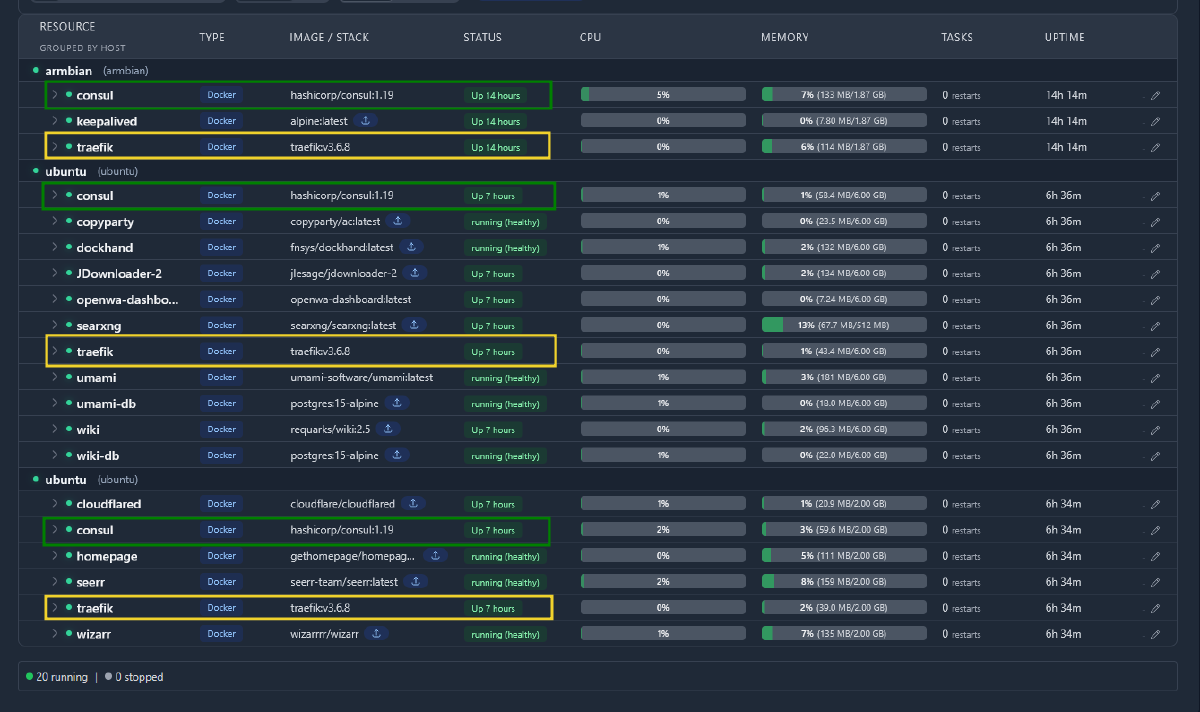
To ensure a proper Consul quorum, we need an odd number of nodes (three in our case):
- Host 1 (10.1.1.22): The primary node. It handles SSL renewals via
acme.shand runs most of the backend workloads. - Host 2 (10.1.1.200): A secondary replica, running only Traefik and Consul.
- Host 3 (10.1.1.11): A tertiary replica, running Traefik, Consul, and a few backend workloads.
2. Deploying the Consul Cluster #
Consul will act as our centralized database for Traefik’s dynamic routing rules.
Here is the compose.yml configuration for Host 1:
version: "3.8"
services:
  consul:
    image: hashicorp/consul:1.19
    container_name: consul
    restart: unless-stopped
    network_mode: host
    volumes:
      - consul-data:/consul/data
    command: >
      consul agent -server
        -bootstrap-expect=3
        -ui
        -data-dir=/consul/data
        -bind=10.1.1.22
        -advertise=10.1.1.22
        -client=0.0.0.0
        -node=consul-node1
        -datacenter=dc1
        -retry-join=10.1.1.22
        -retry-join=10.1.1.200
        -retry-join=10.1.1.11
Note: For Host 2 and Host 3, ensure you modify the
-bind,-advertise, and-nodeparameters to match their respective IP addresses.
3. Configuring Traefik #
All hosts must share the exact same static configuration file (traefik.yaml):
global:
  checkNewVersion: true
  sendAnonymousUsage: false
log:
  level: INFO
api:
  dashboard: true
  insecure: true
entryPoints:
  web:
     address: :80
     http:
       redirections:
         entryPoint:
           to: websecure
           scheme: https
           permanent: true
  websecure:
     address: :443
     forwardedHeaders:
       insecure: true
       trustedIPs:
        - 10.0.0.0/8
        - 172.16.0.0/12
        - 192.168.0.0/16
providers:
  providersThrottleDuration: 2s
  docker:
    endpoint: "unix://var/run/docker.sock"
    exposedByDefault: false
  consul:
    endpoints:
      - "consul:8500"
    rootKey: traefik
  file:
    directory: /etc/traefik/dynamic
    watch: true
The magic happens at providers.consul. Traefik will instantly detect any changes inside the Consul KV store under the traefik/ prefix. Additionally, setting providers.file.watch: true is crucial—it allows Traefik to hot-reload new SSL certificates without dropping active connections.
4. Wildcard Certificate Management (acme.sh) #
Because the open-source version of Traefik does not support storing Let’s Encrypt certificates directly inside Consul, we must manage it externally using acme.sh.
We generate the certificates on Host 1 using a Cloudflare DNS-01 challenge for the domain noorkhafidzin.com:
/home/el/.acme.sh/acme.sh --issue --dns dns_cf \
  -d '*.noorkhafidzin.com' \
  --server letsencrypt

/home/el/.acme.sh/acme.sh --install-cert -d '*.noorkhafidzin.com' \
  --fullchain-file /home/el/traefik-config/certs/wildcard.noorkhafidzin.com.crt \
  --key-file /home/el/traefik-config/certs/wildcard.noorkhafidzin.com.key \
  --reloadcmd "/home/el/.hermes/traefik-renew-hook.sh"
The Synchronization Script #
To distribute the renewed certificates to Host 2 and Host 3, we execute a custom shell script automatically triggered by the --reloadcmd hook.
Create traefik-renew-hook.sh:
#!/bin/bash
CERT_DIR="/home/el/traefik-config/certs"
DYNAMIC_DIR="/home/el/traefik-config/dynamic"
HOSTS="10.1.1.200 10.1.1.11"

echo "Syncing certs to replica hosts..."

for host in $HOSTS; do
  rsync -avz --delete "$CERT_DIR/" "el@$host:$CERT_DIR/"
  rsync -avz "$DYNAMIC_DIR/" "el@$host:$DYNAMIC_DIR/"
done

# Touch tls.yaml to trigger Traefik file-provider hot reload
touch "$DYNAMIC_DIR/tls.yaml"
ssh [email protected] "touch /home/el/traefik-config/dynamic/tls.yaml"
ssh [email protected] "touch /home/el/traefik-config/dynamic/tls.yaml"
In your Traefik dynamic configuration folder, define tls.yaml:
tls:
  certificates:
    - certFile: /var/traefik/certs/wildcard.noorkhafidzin.com.crt
      keyFile: /var/traefik/certs/wildcard.noorkhafidzin.com.key
Call to Action: Native Consul KV ACME Storage
Currently, this setup still relies on syncing raw .crt / .key files (or acme.json) across hosts via rsync. I’ve experimented with several configurations to force Traefik to use Consul KV natively as the ACME storage, but haven’t found the correct working config yet.
If you know how to successfully configure Let’s Encrypt ACME storage directly into Consul KV (without the Traefik Enterprise edition), please let me know in the comments below!
5. Dynamic Configuration via Consul KV #
To route a new domain to a backend container, you don’t need to write YAML files or restart Docker services. You simply inject the configuration into the Consul KV API.
For example, to route app.noorkhafidzin.com to 10.1.1.50:8080:
# 1. Define the Service URL
docker exec consul consul kv put \
  traefik/http/services/app-svc/loadBalancer/servers/0/url \
  "http://10.1.1.50:8080"

# 2. Define the Router Host Rule
docker exec consul consul kv put \
  traefik/http/routers/app-rtr/rule "Host(\`app.noorkhafidzin.com\`)"
docker exec consul consul kv put \
  traefik/http/routers/app-rtr/entryPoints/0 "websecure"
docker exec consul consul kv put \
  traefik/http/routers/app-rtr/service "app-svc"

# 3. Enable TLS (Mandatory)
docker exec consul consul kv put \
  traefik/http/routers/app-rtr/tls "true"
Almost instantly, all Traefik instances across all hosts will absorb the new route.
6. High Availability via Keepalived (VRRP) #
To ensure users seamlessly hit an active Traefik proxy, we assign a Virtual IP (VIP), such as 10.1.1.111. In your DNS settings, you simply point *.noorkhafidzin.com to this VIP.
Install Keepalived on your hosts, and configure Host 1 (/etc/keepalived/keepalived.conf):
global_defs {
    router_id TRAEFIK_HA
}

# Ensure the Traefik API actually responds
vrrp_script check_traefik {
    script "/bin/bash -c 'curl -sf http://localhost:8080/api/version > /dev/null 2>&1'"
    interval 3
    timeout 2
    rise 2
    fall 3
}

vrrp_instance VI_TRAEFIK {
    state BACKUP
    interface eth0
    virtual_router_id 111
    priority 150        # Set lower priorities on Host 2 (e.g., 110) and Host 3 (e.g., 130)
    advert_int 1
    authentication {
        auth_type PASS
        auth_pass traefikHA
    }
    virtual_ipaddress {
        10.1.1.111/24 dev eth0
    }
    track_script {
        check_traefik
    }
}
The check_traefik script continuously monitors Traefik’s health API. If Traefik crashes on Host 1, the health check fails, and Keepalived gracefully migrates the Virtual IP to Host 3 in a matter of seconds.
Conclusion #
By strategically decoupling the load balancer (Traefik), state database (Consul), certificate generation (acme.sh), and IP failover (Keepalived), you build an incredibly resilient infrastructure layer.
You can now freely patch, restart, and upgrade your servers sequentially without causing noticeable disruptions to your end-users.
If you want to compare designs, I also wrote a leaner version that swaps Consul KV for a GitHub-synced file provider: Traefik High Availability with GitHub Sync (No Consul, Simpler Setup).
Have you tried setting up HA for your infrastructure? Share your experiences or questions in the comments below!