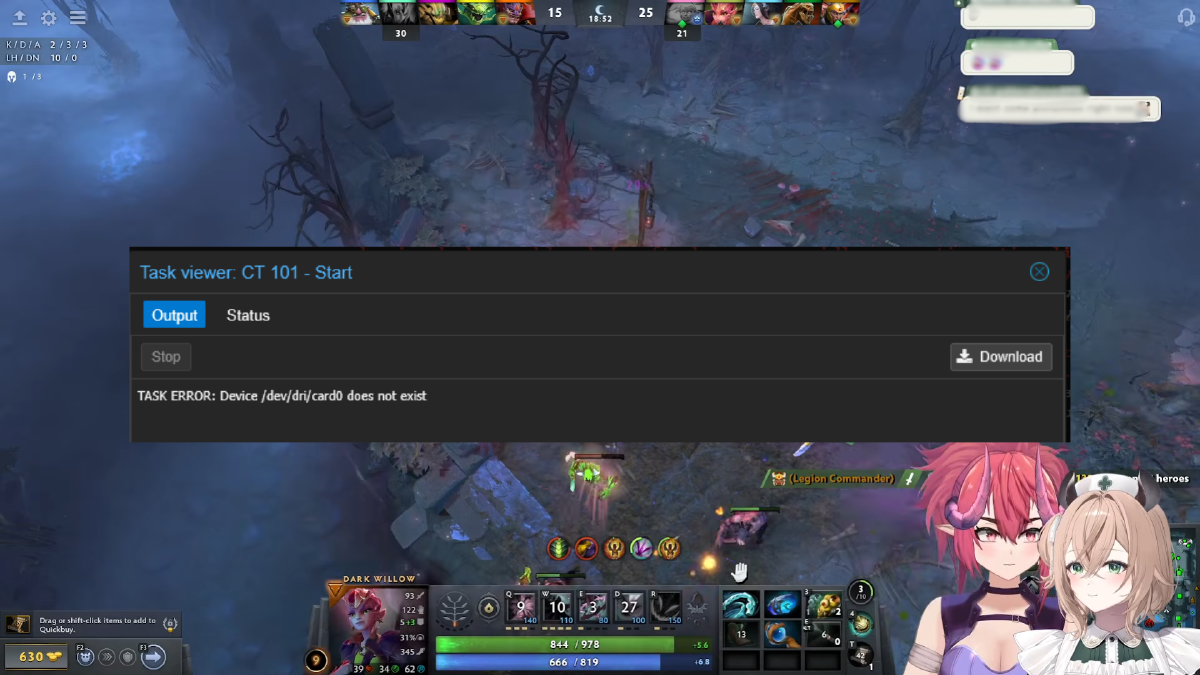


Running Jellyfin inside a Proxmox LXC container is a popular and resource-efficient way to build a self-hosted media server. But there is one error that reliably frustrates homelab users, especially after a hardware upgrade or system reboot: Task ERROR: Device /dev/dri/card0 does not exist (or sometimes Task ERROR: Device /dev/dri/card1 does not exist).
This error completely breaks hardware transcoding in Jellyfin because the LXC container can no longer find the GPU that was passed through. This article explains the root cause and two permanent fixes you can apply directly on the Proxmox host.
Why Does This Error Happen? #
When a Proxmox host boots, the Linux kernel automatically loads a number of drivers. One of them is SimpleDRM (simpledrm), a generic display driver that the kernel uses as a fallback to render output during the early boot phase, before the real GPU driver is ready.
Here is the problem: SimpleDRM registers itself as a DRI device before the actual GPU driver (such as i915 for Intel or amdgpu for AMD) has time to initialize. This makes the /dev/dri/card* numbering non-deterministic across reboots:
- First boot: real GPU registers as
/dev/dri/card0, SimpleDRM ascard1 - Next boot: order may flip, real GPU becomes
/dev/dri/card1
Since the LXC configuration is hardcoded to use card0, every time the real GPU lands on card1, the container fails to find the device and throws the error.
This behavior can also be triggered by a sudden power outage. When the host restores power and reboots, driver initialization order is not guaranteed, so the GPU device path may come back as a different number than before the outage.
Fix 1: Disable SimpleDRM via Kernel Boot Parameter #
The cleanest and most permanent solution is to disable SimpleDRM using the initcall_blacklist kernel boot parameter. This prevents simpledrm from initializing at all, so the real GPU driver always registers first and gets a consistent device number.
First, determine which bootloader your Proxmox host is using:
# Check for GRUB or systemd-boot
efibootmgr -v | grep -i 'grub\|systemd'
# or
ls /boot/grub /boot/efi/EFI/proxmox 2>/dev/null
If Using GRUB #
Edit the GRUB configuration file on the Proxmox host:
vi /etc/default/grubFind the GRUB_CMDLINE_LINUX line and append the following parameter to the end of the existing value:
GRUB_CMDLINE_LINUX="... initcall_blacklist=simpledrm_platform_driver_init"Before and after example:
# Before
GRUB_CMDLINE_LINUX="quiet"

# After
GRUB_CMDLINE_LINUX="quiet initcall_blacklist=simpledrm_platform_driver_init"
Then apply the changes and regenerate the GRUB configuration:
update-grubIf Using systemd-boot #
Edit the kernel cmdline file:
vi /etc/kernel/cmdlineAppend the parameter to the end of the existing line:
root=... quiet initcall_blacklist=simpledrm_platform_driver_initThen regenerate the boot configuration using Proxmox’s built-in tool:
proxmox-boot-tool refreshReboot the Proxmox Host #
After saving your changes and refreshing the boot config, perform a full reboot of the Proxmox host:
rebootOnce the host is back online, verify that the GPU is consistently registered at card0:
ls -la /dev/dri/The output should be stable, and your real GPU will always appear as card0 going forward.
Known Side Effect #
There is one trade-off with this approach: boot splash text will not appear after selecting a kernel in the bootloader menu. This is because SimpleDRM is responsible for rendering text output on screen during the early boot phase, before the full GPU driver is active.
The Proxmox host itself will still run completely normally. You can always review boot logs with:
dmesg | less
# or
journalctl -b
For a homelab setup, this is rarely a concern since you almost never need to watch the boot screen directly.
Fix 2: Create a Stable GPU Symlink via udev Rule #
If you prefer not to touch kernel boot parameters, an alternative approach is to create a udev rule that generates a persistent symlink for your GPU, regardless of what card number the kernel assigns on any given boot.
First, check your GPU vendor ID:
cat /sys/class/drm/card*/device/vendorCommon vendor IDs:
- Intel:
0x8086 - AMD:
0x1002 - NVIDIA:
0x10de
Then create the udev rule file:
nano /etc/udev/rules.d/99-gpu.rulesAdd the following line, replacing the vendor ID with yours:
SUBSYSTEM=="drm", KERNEL=="card*", ATTR{device/vendor}=="0x8086", SYMLINK+="dri/gpu0"Reload and apply the rule:
udevadm control --reload-rules
udevadm trigger
ls /dev/dri/
You should now see a gpu0 symlink in /dev/dri/. Update your LXC config to use it:
nano /etc/pve/lxc/<CTID>.confReplace any reference to card0 or card1 with gpu0, for example:
dev0: /dev/dri/gpu0,gid=44With this approach, the symlink always points to your real GPU regardless of whether the kernel assigned it card0 or card1 on that particular boot.
Which Fix Should You Use? #
Both fixes solve the same problem from different angles.
Fix 1 (disable SimpleDRM) is the more thorough solution. It eliminates the root cause entirely by ensuring the real GPU driver always initializes first. The only downside is the loss of boot splash text, which is acceptable for most headless homelab servers.
Fix 2 (udev symlink) does not change driver initialization order but provides a stable device path that always resolves to your real GPU. This is a good option if you want to avoid touching kernel boot parameters, or if you run multiple GPUs and need finer control over which device each service uses.
Verify Hardware Transcoding in Jellyfin #
After applying either fix and restarting the Jellyfin LXC container, confirm there are no startup errors. Then verify from inside the container:
# Enter the LXC container
pct enter <CTID>

# Check that the GPU device is available
ls -la /dev/dri/

# Check GPU accessibility
vainfo  # for Intel VA-API
# or
radeontop  # for AMD
In the Jellyfin dashboard, go to Dashboard > Playback > Transcoding and confirm that hardware acceleration is active with no error messages.
Summary #
The Task ERROR: Device /dev/dri/card0 does not exist error in Jellyfin LXC on Proxmox is not caused by a misconfigured LXC setup. It is caused by the Linux kernel loading SimpleDRM before the actual GPU driver, making /dev/dri/card* device numbering non-deterministic between reboots. This can happen on any reboot, including after a sudden power outage.
Two permanent fixes are available. The first is to add initcall_blacklist=simpledrm_platform_driver_init to the kernel boot parameters, which ensures the real GPU always registers as card0. The second is to create a udev rule that generates a stable /dev/dri/gpu0 symlink pointing to your real GPU, and update the LXC config to reference that symlink instead.
This solution was originally shared by the community in GitHub issue ProxmoxVE community-scripts #6270 and has been confirmed to work across various GPU setups (Intel, AMD) on Proxmox.