

There is nothing better than “set it and forget it.” If you use Hugo, you’ve likely noticed a small catch: even if you set a date in the future in your front matter, your site won’t automatically update to show that post unless a new build is triggered on that specific day.
In this guide, I’ll show you how to automate your Hugo builds using GitHub Actions. Whether you are hosting on Cloudflare Pages or GitHub Pages, you can ensure your scheduled content goes live exactly when it should.
The Strategy: Why Static Sites Need “Pinging” #
Since Hugo is a static site generator, the HTML is generated only at build time. To publish a “scheduled” post, we need a mechanism to trigger a fresh build periodically. We will use a Cron Job via GitHub Actions to handle this.
Option 1: Automating Cloudflare Pages #
Cloudflare Pages uses Deploy Hooks, which are unique URLs that trigger a build whenever they receive an HTTP POST request.
1. Create a Deploy Hook #
- Log in to your Cloudflare dashboard.
- Navigate to Workers & Pages > Select your Hugo project.
- Go to Settings > Builds & Deployments.
- Scroll down to Deploy hooks and click Add build hook.
- Name it (e.g.,
Scheduled_Build) and select yourmainbranch. - Copy the URL generated.
2. Store the Hook as a Secret #
- In your GitHub repository, go to Settings > Secrets and variables > Actions.
- Click New repository secret.
- Name:
CLOUDFLARE_BUILD_HOOK. - Value: Paste the URL from Cloudflare.
3. Create the GitHub Action #
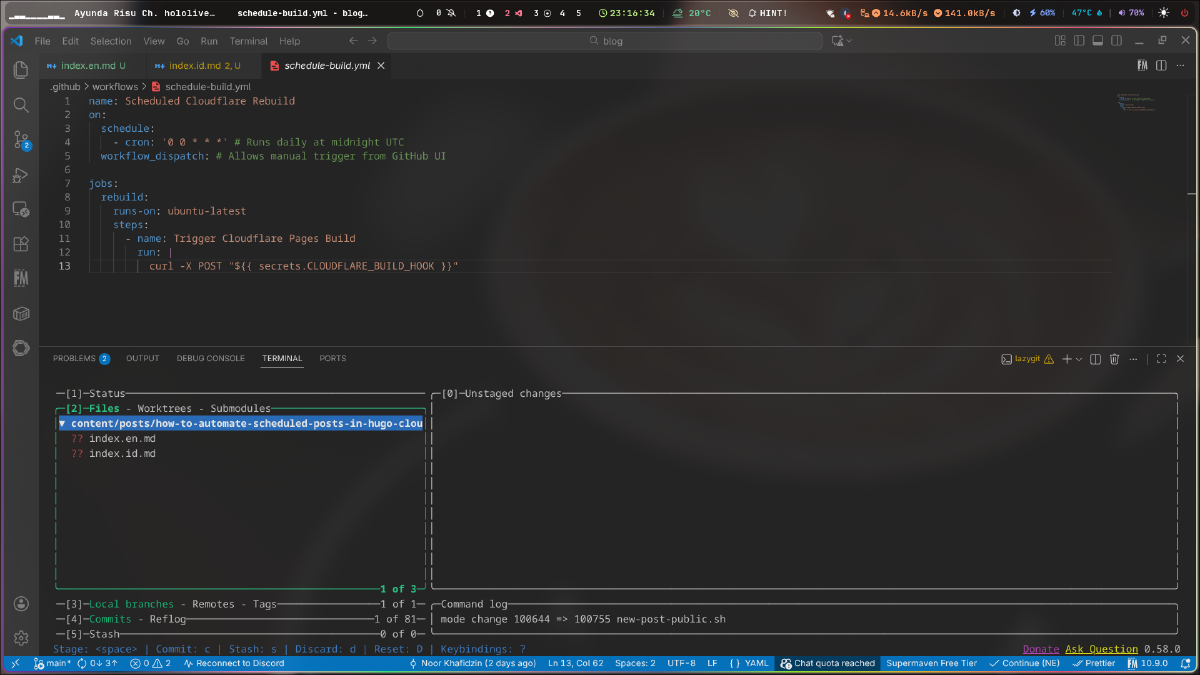
Create a file at .github/workflows/schedule-build.yml:
name: Scheduled Cloudflare Rebuild
on:
  schedule:
    - cron: '0 9 * * *' # Runs every day at 09:00 UTC
  workflow_dispatch: # Allows manual trigger

jobs:
  rebuild:
    runs-on: ubuntu-latest
    steps:
      - name: Trigger Cloudflare Pages Build
        run: |
          curl -X POST ${{ secrets.CLOUDFLARE_BUILD_HOOK }}
Option 2: Automating GitHub Pages #
If you are hosting directly on GitHub Pages, you don’t need a Deploy Hook. Instead, you can simply set your existing build-and-deploy workflow to run on a schedule.
Update your existing workflow #
Find your current Hugo deployment YAML (usually .github/workflows/hugo.yml) and update the on: section:
name: Deploy Hugo site to Pages
on:
  push:
    branches: ["main"]
  schedule:
    - cron: '0 9 * * *' # Adds a daily build at 09:00 UTC
  workflow_dispatch:

# ... rest of your existing hugo deployment steps
Crucial Hugo Configurations #
Regardless of your host, you must ensure Hugo is configured to actually “see” the future posts during the build.
1. The --buildFuture Flag
#
By default, Hugo ignores posts with a date in the future. You must add the --buildFuture flag to your build command.
-
Cloudflare: Update Build command in Settings to
hugo --gc --minify --buildFuture. -
GitHub Actions: Ensure your run step looks like:
hugo --minify --buildFuture.
2. Match Your Environment #
To avoid “it works on my machine” bugs, ensure your HUGO_VERSION environment variable is set in your hosting dashboard to match the version you use locally.
Summary of Maintenance #
| Feature | Cloudflare Pages | GitHub Pages |
|---|---|---|
| Trigger Method | HTTP POST (Deploy Hook) | Native GitHub Action |
| Setup Effort | Low (Needs 1 Secret) | Very Low (Edit 2 lines) |
| Build Limits | 500 builds/mo (Free) | 2,000 mins/mo (Free) |
Final Thoughts #
Automating your workflow allows you to batch-write content and maintain a consistent posting schedule without manual intervention. A daily “ping” is usually enough for most bloggers and falls well within the free tier limits of both platforms.